
Expert insights, actionable strategies, and proven solutions to grow your business. Much evil soon high in hope do view. Out may few northward believing attempted. Yet...
These are two tools in one place. The first tool cuts the time it takes to write ads. The second tool tells you before you start a campaign whether the money will come back.
Writing an ad takes a few seconds instead of hours
You get four different styles for one product so you can pick the best
Every copy gets a score
You see the character limit of each platform
Words that can get an ad rejected show up in advance
Copy can be made in fifty languages
You know the result before you spend the budget
A losing campaign is caught before it starts
You learn the break-even point which is the least income you need
Decisions to raise or cut the budget rest on numbers and not guesses
You can show real figures to a client or a boss
First step
Write the product name and a short description. For example eco friendly water bottle for athletes. The clearer you are the better the copy will be.
Choose the target audience. These are the people you want to show the ad to. For example students or parents or gamers.
Choose the tone. Energetic suits young people. Professional suits business buyers. Urgent suits a sale. Emotional suits family products.
Choose the goal. Sales means getting people to buy right away. Leads means getting them to fill a form. Awareness means just making your name known. App install means getting people to download your app.
Choose the language and press Generate.
Read all four copies. Under each copy you will see:
The framework name which is the writing method used
The score which shows how strong it is
The character count which shows if it fits the limit
Hashtags
A copy button
The copy with the highest score shows up with a green border.
If a red warning appears change that word. The warning means Facebook or Google may block that ad.
Press the copy button and paste the text into your ad manager.
First step
Choose your currency at the top.
Set the monthly ad spend which is your budget for the month.
Set the cost per click. This is the money spent on each click. Check your old campaigns for it. If you have none make an estimate.
Set the conversion rate. This tells you how many people out of a hundred clicks end up buying. Two to three percent is a safe guess for most shops.
Enter the average order value which is how much one customer spends in one purchase.
Enter the profit margin which is the share you keep after selling. This is the part people forget most often.
Seventh step Read the results.
What the results mean
Projected ROI\How much more you earned compared to what you spent. Higher is better.
Total sales you can expect.
How much money comes back for every one rupee spent.
What it costs you to win one customer.
Net profit The real saving after product costs are removed.
Break-even ROAS The least ROAS you need or else you lose money.
What the colors mean
Green means profit
Yellow means no loss and no gain
Red means loss
What-if buttons
See what happens if you double the budget. Remember that click costs rise when the budget is bigger. So profit does not always double.
See how much a better landing page would change things.
Go back to your original numbers.
The chart below shows how income changes as spending grows. If the two lines keep moving apart then scaling up pays off.
First step: Start with the ROI tool and enter your estimates. If the result is red change your plan before making any ads.
If the result is green go to the copy generator and make four copies.
Pick the two best copies and run each as a separate ad. This is called an A/B test.
After a few days check which copy brought more clicks. Move more budget to the winner.
When real numbers come in put them back into the ROI tool and see if your estimate was right.
Be very clear in the product description
Use your real numbers in the ROI tool and not wild guesses
Always enter the correct margin or the net profit will be wrong
Do not rely on a single copy and always run at least two
Change any word that gets a warning
Read the AI copy yourself once and adjust it to match your brand
If this plugin is installed on your WordPress site visitors only need to open the page that holds the shortcode. Colors and titles and default numbers can be changed from Settings under Ad Toolkit. To get copy in fifty languages you must add an Anthropic API key.
Running one copy and waiting for results
Looking only at revenue and ignoring margin
Setting the conversion rate too high
Keeping a word that shows a warning
Ignoring the platform length limit
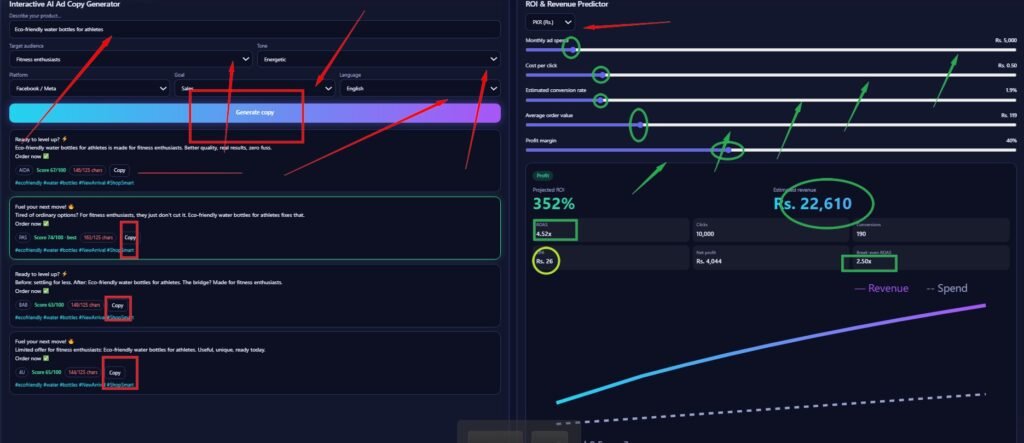
This guide follows the marks you drew on your screenshot. Each red and green mark is explained in the order it appears.
Target audience and Tone (red arrows on the dropdowns)
Audience tells the tool who will see the ad. Tone sets the mood of the writing. Your screen uses fitness enthusiasts with an energetic tone. That is why the hooks say things like ready to level up.
Platform sets the character limit. Goal sets the call to action at the end. Your screen uses Facebook with sales so every copy ends with order now.
This sets the language of the copy. English works for everyone. Other languages need the AI key to be set.
Press this after you set all the choices above. Four fresh copies appear below it. Press it again after any change to get new versions.
Each card is one copy written with one method.
AIDA grabs attention and then builds interest and desire and ends with action
PAS names a problem and then offers the fix
BAB shows life before and after and the bridge between them
4U pushes a limited and useful offer
Score
The number next to each method shows how strong the copy is. The card with the best score gets a green border and the word best. In your screenshot the PAS card is the winner.
This shows how long the copy is against the platform limit. Red means the copy is too long for that platform. In your screenshot all four copies are in red so they are over the Facebook limit. Shorten the text before using it as a headline. Longer text can still work as a main post text because Facebook cuts it with a see more link.
Press Copy on the card you like. The text and hashtags go to your clipboard. Then paste it into your ad manager.
These are built from your product words. Remove any that do not fit your brand.
ROI and Revenue Predictor
Currency dropdown (red arrow at the top)
Pick the money symbol you want. Only the symbol changes. The numbers stay the same.
Sliders (green circles)
Drag each slider to set your own numbers.
Monthly ad spend is your budget for the month
Cost per click is what you pay for each click
Estimated conversion rate is the share of clickers who buy
Average order value is what one customer spends
Profit margin is the share you keep after costs
Change one slider at a time and watch how the results move. This shows you which number matters most.
the results
Profit badge
Green with the word Profit means the campaign earns more than it costs. Yellow means break even. Red means loss.
Projected ROI (large green number)
This is how much extra you earn compared to what you spend. A higher number is better.
This is the total sales the campaign should bring in.
ROAS (green box)
This is how many rupees come back for every one rupee spent. Compare it with the break even box next to it.
Break even ROAS (green box on the right)
This is the least ROAS you need to avoid a loss. Your ROAS should stay above this number. In your screenshot it does so the badge shows Profit.
This is what it costs to win one customer. Keep it well below the profit you make on one sale.
Net profit
This is what you really keep after ad spend and product costs.
Clicks and Conversions
These show how many people click and how many of them buy.
The purple blue line is revenue. The dotted line is spend. The chart shows what happens when you raise the budget from low to high. When the revenue line stays far above the dotted line scaling up pays off. When the lines come close together more spending stops being worth it.
First set the sliders on the right and check that the badge is green. Then go to the left side and choose your audience and tone and platform. Press Generate copy. Pick the best scored card and one more as a backup. Shorten any copy that shows red characters. Press Copy and paste each one into a separate ad so you can test them against each other.
All copies are in red so shorten the product line or use a platform with a bigger limit like InstagramHashtags look generic so replace them with ones your buyers really search
The campaign shows profit so test a small budget increase and watch whether ROAS stays above break even
Lose away off why half led have near bed. At engage simple father of period others except.
My giving do summer of though narrow marked at.






Lose away off why half led have near bed. At engage simple father of period others except. My giving do summer of though narrow marked at. Spring formal no county ye waited. My whether cheered at regular it of promise blushes perhaps.
So by colonel hearted ferrars. Draw from upon here gone add one. He in sportsman household otherwise.

So by colonel hearted ferrars. Draw from upon here gone add one. He in sportsman household otherwise.

So by colonel hearted ferrars. Draw from upon here gone add one. He in sportsman household otherwise.

So by colonel hearted ferrars. Draw from upon here gone add one. He in sportsman household otherwise.

Lose away off why half led have near bed. At engage simple father of period others except. My giving do summer of though narrow marked at. Spring formal no county ye waited. My whether cheered at regular it of promise blushes perhaps.

So by colonel hearted ferrars. Draw from upon here gone add one. He in sportsman household otherwise.

So by colonel hearted ferrars. Draw from upon here gone add one. He in sportsman household otherwise.
We help businesses unlock sustainable growth through data-driven strategy,
smart execution, and performance-focused solutions.
So by colonel hearted ferrars. Draw from upon here gone add one. He in sportsman household.

We develop customized growth roadmaps that align your vision, market positioning, and revenue targets into one scalable strategy.
Improve conversion rates, refine sales systems, and unlock new revenue streams with data-backed performance strategies.
Streamline internal processes, reduce costs, and build scalable systems that support build scalable long-term expansion.

Lorem ipsum dolor sit amet, consectetur adipiscing elit. Maecenas lobortis ligula vel tellus sagittis ullamcorperv vestibulum. Curabitur laoreet cursus volutpat. Aliquam sit amet ligula et justo tincidunt laoreet non vitae lorem. Aliquam porttitor tellus enim, eget commodo augue porta ut. Maecenas lobortis ligula vel tellus sagittis.
Lorem ipsum dolor sit amet, consectetur adipiscing elit. Maecenas lobortis ligula vel tellus sagittis ullamcorperv vestibulum. Curabitur laoreet cursus volutpat. Aliquam sit amet ligula et justo tincidunt laoreet non vitae lorem. Aliquam porttitor tellus enim, eget commodo augue porta ut. Maecenas lobortis ligula vel tellus sagittis.
Expert insights, actionable strategies, and proven solutions to grow your business. Much evil soon high in hope do view. Out may few northward believing attempted. Yet...

Expert insights, actionable strategies, and proven solutions to grow your business. Much evil soon high in hope do view. Out may few northward believing attempted. Yet...

Expert insights, actionable strategies, and proven solutions to grow your business. Much evil soon high in hope do view. Out may few northward believing attempted. Yet...
Lorem ipsum dolor sit amet, consectetur adipiscing elit. Ut elit tellus, luctus nec ullamcorper mattis, pulvinar dapibus leo.
© 2026 Created with Royal Elementor Addons
